
Shipping an AI Health App: Disclosure, Sources and Consent
Short answer
An AI health app gets more scrutiny than a typical app. Tell users plainly that an AI service processes their photos and text, and get permission first. Cite the sources behind any health guidance and label AI numbers as estimates, not medical advice. Ask for health-data consent separately from the terms. When the AI fails, show an error rather than a made-up number. Check subscription access on the server side.
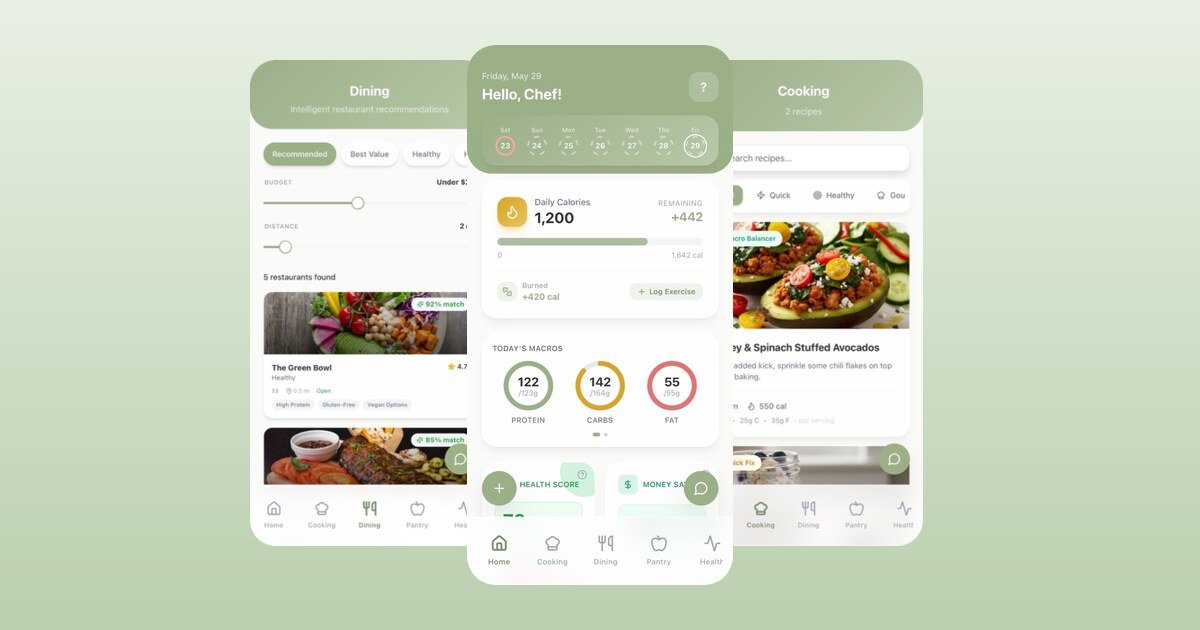
Eats AI is a nutrition app: snap a photo of your meal and it logs calories and macros, suggests recipes from what's in your pantry, plans meal prep and tracks your progress. I built the first version in Flutter with Firebase and Gemini, and took it through launch on the App Store and Google Play.
The AI feature was the quick part. Most of the launch work was making an AI app that talks about health acceptable to Apple, Google and privacy law. Here's what that involved.
1. Disclose the AI, and ask before sending data
In November 2025 Apple updated Guideline 5.1.2(i): apps must clearly disclose when personal data is shared with third parties, including third-party AI, and get explicit permission first. A meal photo sent to a model is exactly that.
Eats AI shows an AI disclosure dialog when the user first reaches the home screen, and again before AI features until they tick "don't show again". It says which features use AI (food recognition, nutrition estimates, recipes, meal plans, activity estimates, health reports) and that meal images, ingredient lists or food descriptions are processed by third-party AI providers only to produce the result the user asked for. The dialog can't be dismissed by tapping outside it; the user has to choose. The privacy policy says the same thing in more detail.
The implementation is small: a helper checks whether the user has already accepted, shows the dialog if not, and only then continues with whatever was waiting on it.
AiDisclosureHelper.show(
  context: context,
  onContinue: () {
    // runs only after the user has seen and accepted the disclosure
  },
);
2. Cite your sources and label estimates
Apple reviews health apps that could give inaccurate data more strictly (Guideline 1.4.1), and Google Play has its own health app policy and declaration. A nutrition app that shows a "health score" or calorie targets with no basis is an easy rejection, and rightly so.
The screens in Eats AI that give health or nutrition guidance (food, meals, meal prep, recipes, health and the health score) have a "Sources & References" section linking to where the guidance comes from: USDA FoodData Central, the CDC, the WHO and the NIH. The terms state plainly that the app is not a medical device and doesn't give medical advice, diagnosis or treatment.
Label AI numbers as estimates wherever they appear. That helps users too: people treat a number differently when they know it's an estimate.
3. Separate consent for health data
Meal photos, weight and step counts are health data. Under GDPR that's a special category that needs explicit consent, separate from accepting the terms. Eats AI's onboarding has a dedicated, required health-data consent checkbox, and analytics is a separate, optional opt-in that's off by default. I wrote up how that works in Flutter and Firebase in Opt-In Analytics and Crashlytics in Flutter.
4. Let the AI fail honestly
An earlier version returned a placeholder of about 300 calories when meal analysis failed, so the screen always showed something. In a health app that's worse than an error: the user logs a made-up number and never knows. I changed it to fail honestly: if the analysis fails, the user sees an error, not an invented estimate.
The same applies to parsing model output. Model JSON is parsed with null-safe defaults, so one missing field doesn't crash the screen, but the defaults never invent nutrition values.
5. Account deletion and data export
Both stores require in-app account deletion for apps with accounts. Eats AI has it, plus an "Export All Data" option that produces CSV files of meals, weight, food items and recipes. Export isn't required for review, but it's what GDPR's right to data portability expects, and it shows good faith.
6. A paywall that can't be unlocked locally
Eats AI is a subscription app with a free trial, and subscriptions go through RevenueCat. Access to premium features is checked against the RevenueCat entitlement, not a flag stored on the device. If the subscription check lived in local storage, anyone with a modified app could unlock everything. During the security review I confirmed this path specifically, because it protects the business.
7. Know when your app breaks
A central logger feeds Firebase Crashlytics, and a BLoC observer reports every state-management error automatically. During the fast release cycle after launch, that's how real problems showed up with enough context to fix them. Crash reporting is opt-in like analytics, so it respects the same consent choice.
8. Ask for ratings at the right moment
Ratings drive store visibility, but both Apple and Google say not to prompt on demand or after a failure. Eats AI requests a review only when a user reaches a logging-streak milestone (3, 7, 14, 30 days and so on), once per milestone, with a 60-day cooldown on top of the system's own limits. It asks happy users at a happy moment.
The checklist
- AI disclosure shown before the first AI call, with explicit permission.
- Sources cited where the app gives health guidance; AI numbers labelled as estimates.
- Separate, explicit health-data consent; analytics opt-in.
- No invented fallback values when the AI fails.
- In-app account deletion; data export.
- Subscription access checked server-side.
- Crash reporting in place before launch, under the same consent.
- Privacy label, Data safety form and privacy policy all describe the same data.
None of this is the exciting part of an AI app, but it's what kept the app on the store.
Share this article
You Might Also Like

Agentic Development: Building Autonomous AI Workflows
Move beyond single-prompt generation. Discover Agentic Development, where AI agents plan, execute, and iterate on complex software tasks autonomously.
Read More →
The New Era of AI-Assisted Development
AI is reshaping how we write, test, and deploy code. Learn how to integrate AI tools into your daily workflow without losing your edge as a developer.
Read More →
Vibe Coding Cleanup: Refactoring AI-Generated Spaghetti
Inherited a codebase built purely on 'vibes'? Here is a systematic guide to untangling, refactoring, and securing AI-generated spaghetti code.
Read More →