
Eats AI: AI Nutrition Tracker Built with Flutter and Gemini
Duration
First version, launch & compliance
Year
2026
My Role
Flutter developer for the first version, then release and compliance lead: built the app end to end, launched it on the App Store and Google Play, and owned privacy, AI-disclosure and security work
Technologies Used
The Challenge
Calorie tracking works, but most people quit because logging is a chore: search a database, guess a portion, type it in, three times a day. Eats AI's idea was to make the phone do that work. Take a photo of a plate and get calories and macros, cook from what's already in the pantry, plan a week of meals, and see progress without doing any maths. The client wanted all of that in one subscription app for iPhone and Android. A health app with AI output has extra rules to meet. Apple and Google expect health claims to cite sources, AI-generated content to be disclosed, and health data to be handled with explicit consent. And the AI has to be reliable enough that people keep paying.
The Solution
Building the first version
I took the project from its early setup to a complete, shippable app: one Flutter codebase for iOS and Android with about 60,000 lines across every core feature.
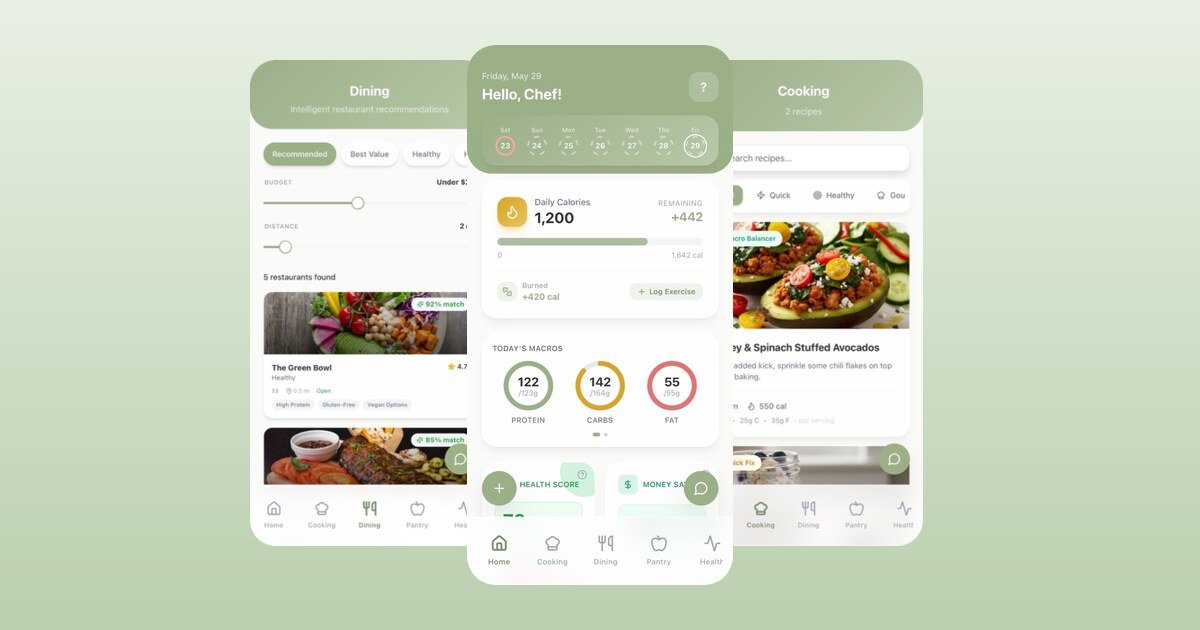
- Snap to log. Photograph a meal and Gemini (through Firebase AI Logic) returns the dish, portions, calories and macros, which the user confirms before saving.
- Recipes and meal prep. AI recipes from the ingredients you have, filtered by cooking time, diet and goals, plus multi-day meal-prep plans.
- Health and activity. Weight journey, BMI gauge, AI health report, workout logging, and activity data from Apple Health.
- Personal goals. Onboarding turns age, body metrics, activity level and dietary preferences into daily calorie and macro targets.
- Subscriptions with RevenueCat. Entitlements are checked against RevenueCat, not a local flag a user could change.
- Architecture. BLoC for state per feature, a repository layer over Firestore, Hive for on-device state, go_router navigation, light/dark mode and custom theme colours.
Store readiness for a health + AI app
- AI disclosure. A first-run dialog explains that results are AI-generated estimates, so users know what they're relying on.
- Cited sources. Nutrition, health and activity screens show where their guidance comes from (USDA FoodData Central, CDC, WHO and NIH) with a medical disclaimer.
- Consent, GDPR and CCPA. Separate, explicit consent for health-data processing; analytics and crash reporting off until the user opts in, changeable later in Settings; consent choices recorded for audit.
- Data export and deletion. An "Export All Data" CSV of meals, weight, food items and recipes, next to in-app account deletion.
- Crash reporting. A central logger feeding Firebase Crashlytics, with BLoC errors reported automatically, so production issues show up with context.
Launch and releases
- Shipped version 1.0 to the App Store, then ran a fast release cycle of fixes and features through the weeks after launch.
- Prepared the Android release and its signing setup for Google Play.
- Wrote App Store Optimization copy (title, description and keywords) in English and Spanish, and added an in-app review prompt shown only to engaged, high-streak users.
- Ran security reviews of the app and its Firebase backend, then handed the findings to the client's team with a prioritised fix list.
Decisions & Trade-offs
- Gemini through Firebase AI Logic. The app already ran on Firebase, so the model is called through the Firebase SDK with no separate AI backend to host or secure. The trade-off is less control over model routing than a custom server would give.
- Flutter for both platforms. One codebase for iPhone and Android kept a small team shipping weekly. Native work was limited to Apple Health and store setup.
- RevenueCat as the source of truth for access. The paywall checks entitlements with RevenueCat, so changing local storage can't unlock premium features.
- Telemetry is opt-in. Analytics and Crashlytics stay off until the user agrees. You get less data from users who say no, and in return GDPR/CCPA compliance is straightforward.
- Show the sources, label the estimates. Citing USDA, CDC, WHO and NIH, and marking AI numbers as estimates, makes the app easier to trust and easier to approve as a health app.
Results
- Live on the App Store (iPhone, iOS 15.5+, also runs on Apple Silicon Macs and Apple Vision Pro) and Google Play.
- Available in English and Spanish.
- Subscription business from day one: a free trial, then monthly or annual plans through RevenueCat.
- The codebase I built is the base the client's team keeps extending, with restaurant menu picks, an AI coach, fasting, water tracking and pantry management added on top.
Impact
Eats AI shows what it takes to ship an AI health app rather than demo one. The photo-to-macros moment is the hook, but the work that keeps the app in the stores sits behind it: clear AI disclosure, cited sources, explicit health-data consent and a subscription setup that can't be bypassed.