
From Idea to the App Store as an Indie Developer: Google Stitch, OpenCode and Claude
Short answer
I write a one-page brief, design every screen in Google Stitch and commit the export to the repo. OpenCode turns those mockups into a Flutter UI: design tokens first, then shared widgets, then screens, following a written plan. Claude does the part that makes it a product: the real logic, the backend, security, tests and store compliance. I review every step, because each tool is confident about things it can't know.
I build my own apps alone. No designer, no second engineer, no QA team. For a long time that meant picking two of three: good-looking, well-built or shipped this quarter. This year I settled on a pipeline that gets me all three more often than not, and most of my recent apps have gone through it.
The clearest example is NFC Wizard, my NFC tag reader and writer. The repo's first commit was on August 8, 2026. It went live on the App Store on October 23. This post walks through how it got there, stage by stage, including where each tool got things wrong.
Stage 0: the idea, written down
Before I open any tool, I write the problem in a paragraph. For NFC Wizard it was this: NFC apps are either power tools that assume you know what an AUTH0 byte is, or single-purpose apps that write a link and stop. The people in between, like an events team tagging 500 wristbands or someone who wants a business card on a sticker, end up juggling three apps.
That paragraph becomes the project brief: who it's for, the core modules, the user journey, the look. If I can't write the brief, I don't have an app yet, just a feature.
Stage 1: design in Google Stitch
Stitch is Google's AI UI designer. You describe a screen and it generates a mobile or web design you can keep refining. I use it as my designer.
Name the design direction first
Generic prompts get generic screens. So I name the design system and give it a few hard rules. NFC Wizard's was "Nexus Technical": charcoal surfaces (#10131a), electric blue (#00D4FF) only for primary actions and connection status, Sora and Inter for type, glows only where something is tappable. Stitch keeps that in a DESIGN.md, and every new screen follows it.
Generate the journey, not a screen
I go through the brief in order: onboarding, the main dashboard, each feature, history, settings, the paywall. NFC Wizard ended up with 20 screens. When a screen isn't right I ask for a variant instead of rewriting the prompt, so the export has folders like premium_upgrade_1 and premium_upgrade_2, or qr_to_nfc and qr_to_nfc_optimized. Picking between two real options is faster than describing a perfect one.
Commit the export
Each Stitch screen exports as a folder with a screen.png and a code.html. The HTML is Tailwind with a full Material 3 colour scheme in its config:
"surface-dim": "#10131a",
"surface-container-high": "#272a31",
"primary-container": "#00d4ff",
"primary-fixed-dim": "#3cd7ff",
The whole export goes into a stitch/ folder in the repo, next to the brief and the DESIGN.md. From then on the design is part of the source code: every later step can read it, and it has history.
What Stitch gets wrong: it designs features that don't exist
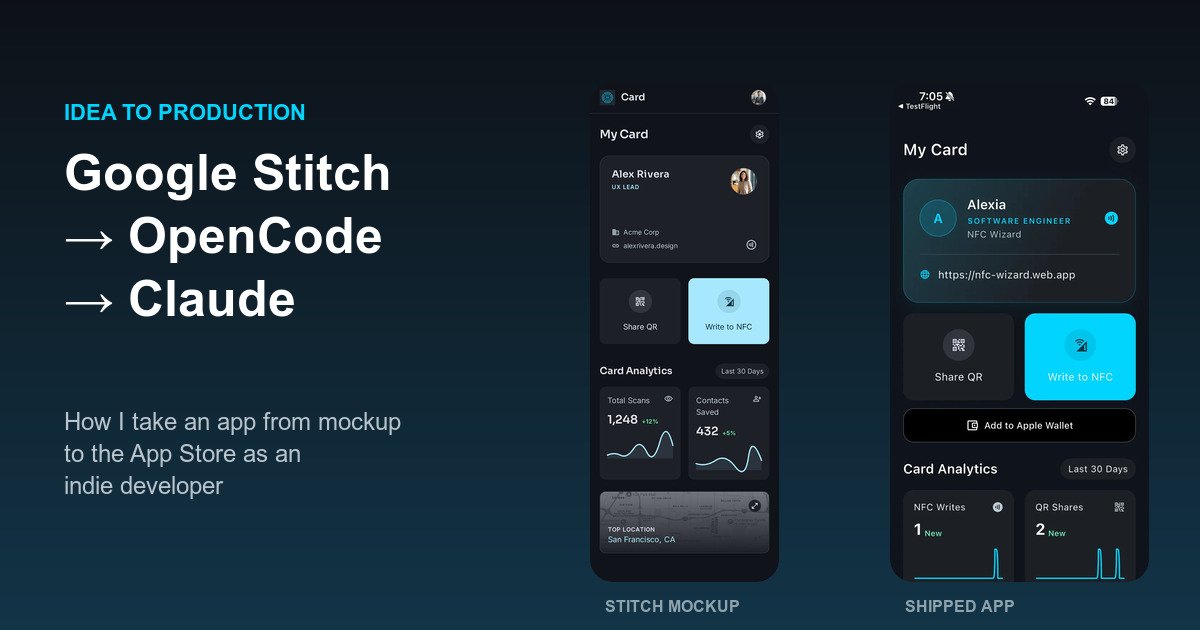
Stitch makes very convincing screens. Some of them promise things the product can't deliver. This is the mockup of NFC Wizard's "My Card" screen next to what shipped:
- The mockup shows Total Scans: 1,248, Contacts Saved: 432 and a map with a top location. A business card on an NFC sticker is a passive tag. When someone else's phone reads it, nothing tells my app. The shipped screen counts what the phone itself does: NFC writes and QR shares over 30 days.
- The brief promised AES-128 encryption. The NTAG213/215/216 chips most people buy support a 32-bit write password, not AES. The shipped security feature is that password protection, built from NXP's datasheet.
- Placeholder branding leaks in. The first round of mockups called the app something else and had demo URLs on a made-up domain, inside the HTML that the next stage reads.
So before any code, I go through every screen and ask of each number, toggle and promise: can the hardware, the platform and the store rules actually support this? Anything that fails gets cut from the design, not left for "later".
Stage 2: OpenCode turns mockups into Flutter
OpenCode is an open-source coding agent that runs in the terminal. I use it for the big, mostly mechanical job of turning 20 to 50 HTML mockups into a Flutter UI.
Write the project rules once
OpenCode reads a project instructions file before it does anything. Mine sets out the architecture and the conventions, so I'm not repeating them in every prompt. For Wellis Daily, a Flutter wellness app I'm building now, it says:
- Riverpod for state, GoRouter for navigation.
- Feature-first folders, clean architecture and MVVM. No business logic in the UI layer.
.autoDisposeproviders, kept inside their feature.- Type-safe assets through FlutterGen, and the responsive extensions for sizes.
- Update
HANDOFF.mdat the end of every session.
Ask for a plan before any code
The first prompt is never "build the app". It's: read every mockup and the design system, then write an implementation plan. For Wellis Daily that plan covers 47 mockups, and it has the parts I care about:
- Design tokens. The exact hex values from the Tailwind config become a Dart colour class, along with type, spacing and radii.
- A component library. Buttons, inputs, cards, the bottom nav, built once in
lib/src/widgets/before any screen. - A route map and the provider structure.
- Screens in priority order. P0 (splash, onboarding, home) first, then features, then settings and edge states.
- An anti-pattern checklist taken from the design doc. For Wellis Daily that's things like no streaks, no red notification badges, no urgency language. Each screen is checked against it.
Then OpenCode works through the plan one phase at a time, and marks what's done. The plan is a file in the repo, so I can stop for a week and pick it up again.
On NFC Wizard, the Stitch tokens ended up as the app's colour class, with a pointer back to where they came from:
/// Design tokens for the "Nexus Technical" design system (see stitch/nfc_hub/DESIGN.md).
abstract final class AppColors {
  static const Color primary = Color(0xff00d4ff);
  static const Color surface = Color(0xff10131a);
  static const Color surfaceContainerHigh = Color(0xff272a31);
  // ...
}
What you have at the end of this stage
Screens that look like the mockups, with fake data. That's all. Wellis Daily's plan is honest about it: the screen phases are done, and the phase with dark mode, the tests, performance profiling and the accessibility audit hasn't started. A converted UI looks finished in a screenshot. It's maybe a third of the work.
Stage 3: Claude does the real implementation
This is where I use Claude, mostly through Claude Code in the terminal and in VS Code. The job changes from "make it look right" to "make it work, and keep working when things go wrong". For NFC Wizard that meant:
- A hand-written NDEF codec, so I control every byte: the URI prefix table, UTF-8 text records, vCards and the Wi-Fi Simple Configuration format Android uses to join a network.
- NTAG password protection from NXP's datasheet. Identify the chip with
GET_VERSION, then write the password, the acknowledgement and the protection boundary in a fixed order. Get the order wrong and the tag locks itself with the factory password. Android and iOS even return different bytes for the same ACK. - One seam for the hardware. Every raw command goes through a single
transceivefunction, so the riskiest code is unit-tested without a phone or a tag. - A bulk writer that reads every tag back to verify it, skips a tag still sitting on the phone, logs failures without stopping and pauses cleanly.
- The backend: default-deny Firestore and Storage rules with their own emulator tests, Cloud Functions that sign Apple Wallet passes behind authentication and App Check, and in-app account deletion done in an order that can't leave half an account behind.
- Money: RevenueCat subscriptions, a one-time "remove ads" purchase, and ads that don't use the advertising identifier, so there's no tracking prompt on iOS.
By launch it had about 240 automated Flutter tests, plus separate suites for the security rules and the Cloud Functions.
How I work with Claude
- One instructions file for every agent. The project's rules live in
AGENTS.md, which OpenCode and most other agents read.CLAUDE.mdjust imports it with@AGENTS.md. The rules exist once, so the two tools can't drift apart. - A handoff file. At the end of every session the agent updates
HANDOFF.md: current state, next steps, known issues, and a dated changelog. The next session, mine or an agent's, starts from facts instead of memory. NFC Wizard's handoff has entries like "Fix iPhone tag reads (cross-platform cast)" and "Fix iOS session_already_exists", the bugs that only show up on a real device. - A prompt log. Prompts that worked go into
PROMPTS.mdand get reused across apps: the landing page, privacy policy and terms; a security-headers review; a full UTM attribution system for the website. - Specific prompts. "Review my app as a security specialist and make sure I have strong security headers and a solid baseline security posture" gets a real review. "Make it secure" doesn't.
Stage 4: production
Shipping is its own stage, and I do it with Claude as well, because it's mostly reading rules carefully:
- A privacy policy that names every SDK the app actually uses, checked against the code.
- An App Store listing that only promises what iOS can do. App-launch records, Bluetooth pairing and joining Wi-Fi from a tag work on Android only, so they aren't in the iOS copy.
- A keyword field that doesn't repeat words already in the app name.
- Rating prompts with rules: only after 5 successful scans or writes, at least 2 days after install, at most every 120 days.
- A pre-rendered website with structured data, real 404s, and analytics that load only after cookie consent.
I've written more about this part in What I Check in a Product Audit Before Launch.
Why three tools and not one
Each one is good at a different kind of work:
| Stage | Tool | Good at | I still check |
|---|---|---|---|
| Design | Google Stitch | A consistent design system and a full set of screens in days | Every number and feature on every screen |
| Conversion | OpenCode | Long, rule-following work: tokens, widgets, dozens of screens | That it followed the architecture rules and didn't hard-code data |
| Implementation | Claude | Protocols, backend, security, tests, store rules | Every diff, and the app on a real device |
The stages are also checkpoints. The design is fixed before conversion starts, and the UI is fixed before the logic goes in. When something goes wrong, I know which stage to go back to.
What I'd tell another indie developer
- Put the design in the repo. Mockups in a design tool are a picture. Mockups in
stitch/are an input every agent can read. - Audit the mockups before you convert them. It costs nothing to delete a fake analytics chart from a design. It costs a lot to explain it to App Review.
- Plan, then build, in that order. A written plan with phases and checkboxes is what lets one person run a project of 50 screens.
- Write the rules once. One
AGENTS.md, oneHANDOFF.md, one prompt log. - Test on hardware. No tool told me Android and iOS return different bytes for the same NFC acknowledgement. A tag on a phone did.
None of these tools replaces deciding what the product is and saying no to what it shouldn't be. They just mean one person can carry an idea all the way to the App Store. If you want to see the result, the full story is in the NFC Wizard case study. And if your own AI-built app needs that last third, I wrote about cleaning up AI-generated code too, and it's the work I do in app launch readiness.
Share this article
You Might Also Like

Building Highly Scalable Applications Using AI
Leveraging AI for intelligent caching, auto-scaling predictions, and microservices optimization to build robust, highly scalable applications.
Read More →
What I Check in a Product Audit Before Launch
A practical pre-launch product audit checklist: the architecture, UX, security, performance, store and analytics checks I run before an app goes live, and why each one matters.
Read More →
How Uber Computes Estimated Time of Arrival (ETA)
How Uber ETA works: a deep technical breakdown of how Uber computes estimated time of arrival using map matching, graph routing, machine learning, real-time traffic updates, and uncertainty modeling at global scale.
Read More →